Turn Energy Documents
into Searchable
Data
Document & Data Intelligence — Crawler by NthDS
Crawler classifies and extracts reports, permits, completions, logs, maps, and tables into structured, searchable data. Search your archive, review original pages, and explore well maps. Bring the public record alongside your files with integrated NDEX. 73,000+ wells processed.
Find the Record. Explore the Data.
Move from a searchable document library to structured records and mapped wells. Review extracted data and findings against the original source pages.
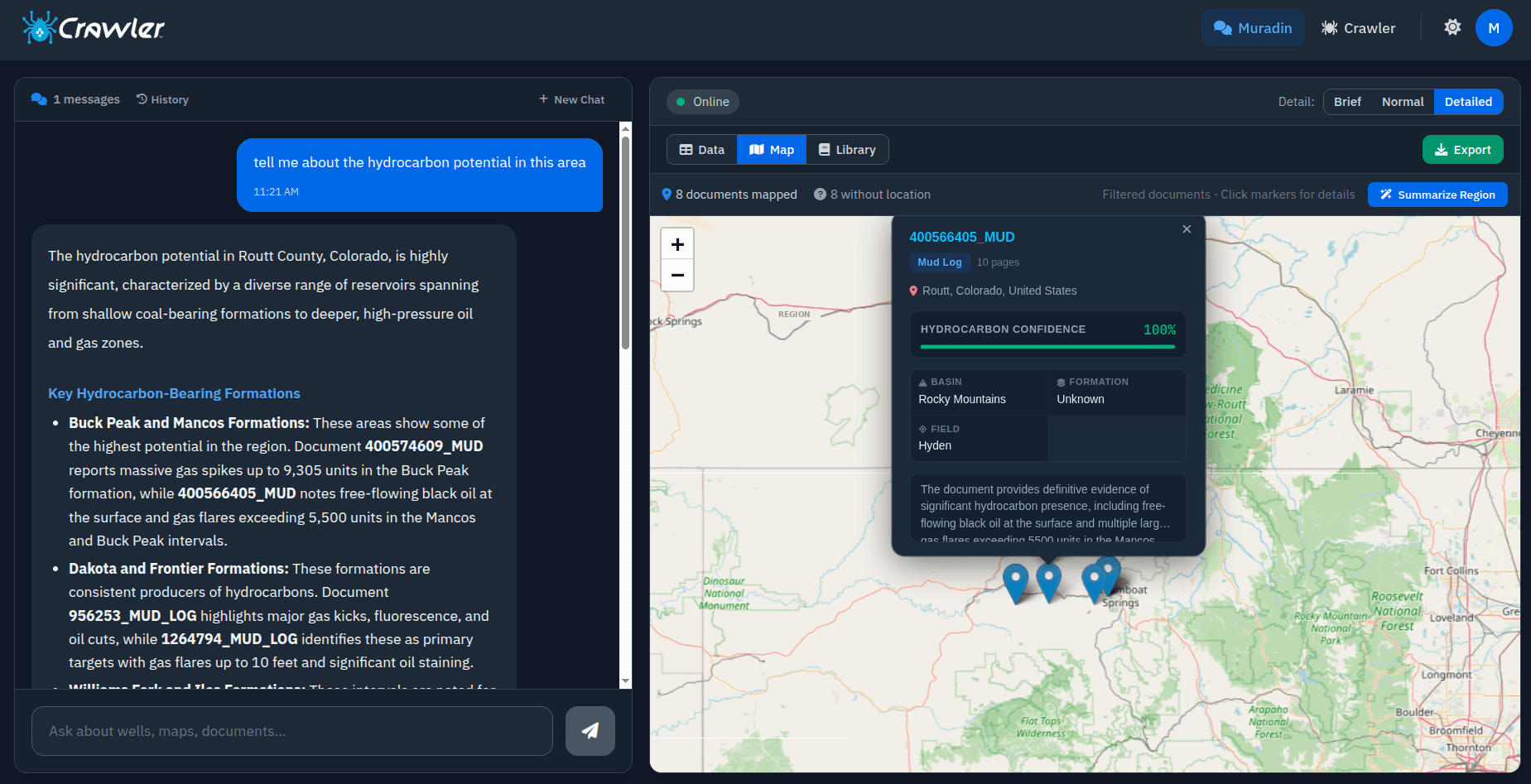
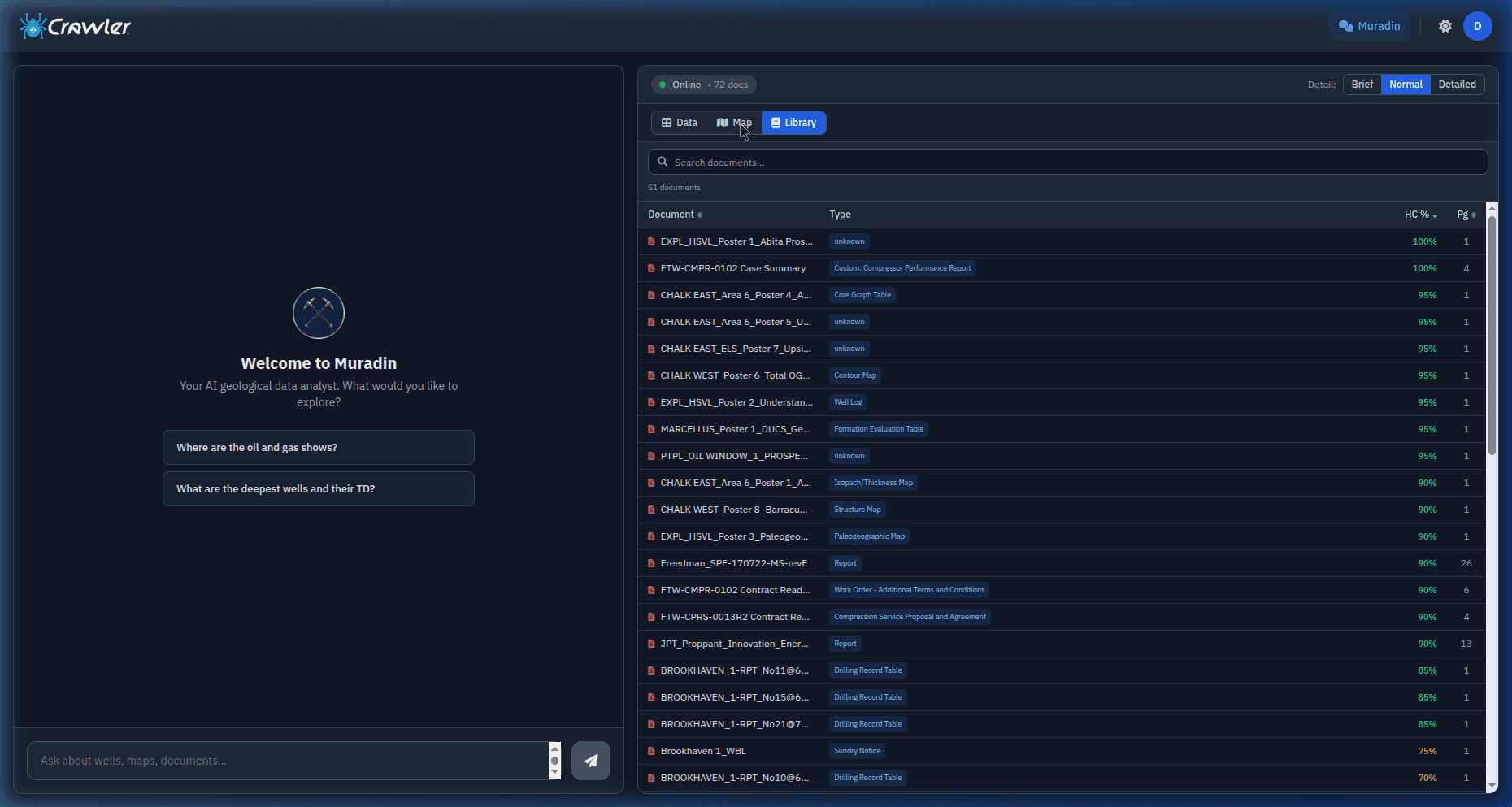
Crawler Data. NDepth Analysis.
Organize your archive with Crawler, then use NDepth to ask questions and analyze the data with source citations. Explore findings on a map and return to the original records.
Find records by well, API/UWI, operator, formation, or county. Filter by document type and location.
Open the original page beside its extracted tables and findings. Export structured records to CSV or Excel for your next workflow.
From Well Files to a Searchable Library
Start with PDFs, TIFFs, folders, or a NAS archive. Index and classify the pages, review the extraction quote, then approve the work you need.
For questions answered with source-page citations, add NDepth. Crawler provides archive search, source review, maps, and exports.
What Crawler Does
Document Classification & Extraction
Turn reports, permits, completions, logs, maps, and tables into typed, structured data. Crawler supports 100+ G&G document types and shows the extraction quote before you approve the work.
Interactive Geospatial Map
Explore located documents and wells on one map. Cluster and zoom across your archive, inspect hydrocarbon show indicators, and open the source document from a well pin.
Integrated NDEX Public Catalog
Explore the public well record alongside your own archive. Filter the NDEX catalog to see where public well data, LAS availability, and reported shows can help fill gaps in your coverage.
Original Source Viewer
Review extracted tables, summaries, and log findings beside the original document page. Move through the page filmstrip or open a full-screen source image to check the underlying evidence.
Structured Data & Export
Work with extracted records organized by well, document, and page type. Download data as CSV or Excel so your team can use it in analysis, diligence, and reporting workflows.
Searchable Files & Data
Browse your archive by file, well, or page type. Search by API/UWI, operator, formation, county, or file name, then filter the results and review the records you need.
Bring Your Archive into Crawler
Process your document archive and explore available public records beside it. Discuss custom integrations, deployment options, and access requirements with the team.
Files & Folders
Start with PDFs, TIFFs, or folders of well documents.
NAS Archives
Scope processing from network-attached archive storage with the team.
Public Well Catalog
Explore available NDEX public records alongside your archive with the catalog add-on.
Custom Integrations
Discuss APIs, databases, and platform mappings. Integration scope depends on your systems and access requirements.
Built for subsurface data teams.
Frequently Asked Questions
What is NthDS Crawler?
Crawler turns energy documents into a typed, searchable data library. It classifies and extracts reports, permits, completions, logs, maps, and tables, organizes records by file and well, and provides original-page review, maps, and CSV or Excel exports. The NDEX public catalog is integrated into the workspace.
How does Crawler handle document classification?
Crawler classifies 100+ G&G document types, including reports, forms, permits, completions, maps, plots, drilling and production tables, core analysis, PVT, DSTs, surveys, and logs. Page types guide extraction, and metadata helps organize the resulting searchable library.
How does NDEX work with Crawler?
The integrated NDEX public catalog lets teams explore public well records alongside their own archive, including well headers, LAS curve inventory, depth-indexed hydrocarbon shows, perforations, and reported temperatures where available. Filters help teams assess coverage and identify gaps. Catalog access is available as a workspace add-on. Buying individual wells inside Crawler is planned; current per-well purchases take place in the separate NDEX marketplace.
Can Crawler be deployed on-premise?
Discuss on-premise or hybrid deployment with the team. The deployment scope depends on your environment, network restrictions, authentication, retention, and acceptance requirements; these are agreed during technical scoping.
What industries does Crawler support?
Crawler is built for energy teams working with varied technical archives: G&G and subsurface, A&D and diligence, land, operations, and technical services. Well logs are one supported document family alongside reports, permits, completions, maps, and tables.
See What's Been Overlooked
Let Crawler find the intelligence trapped in your documents. Schedule a demo using the reports, tables, maps, and well files your team works with.