Digitize Core Analysis Scans to Excel
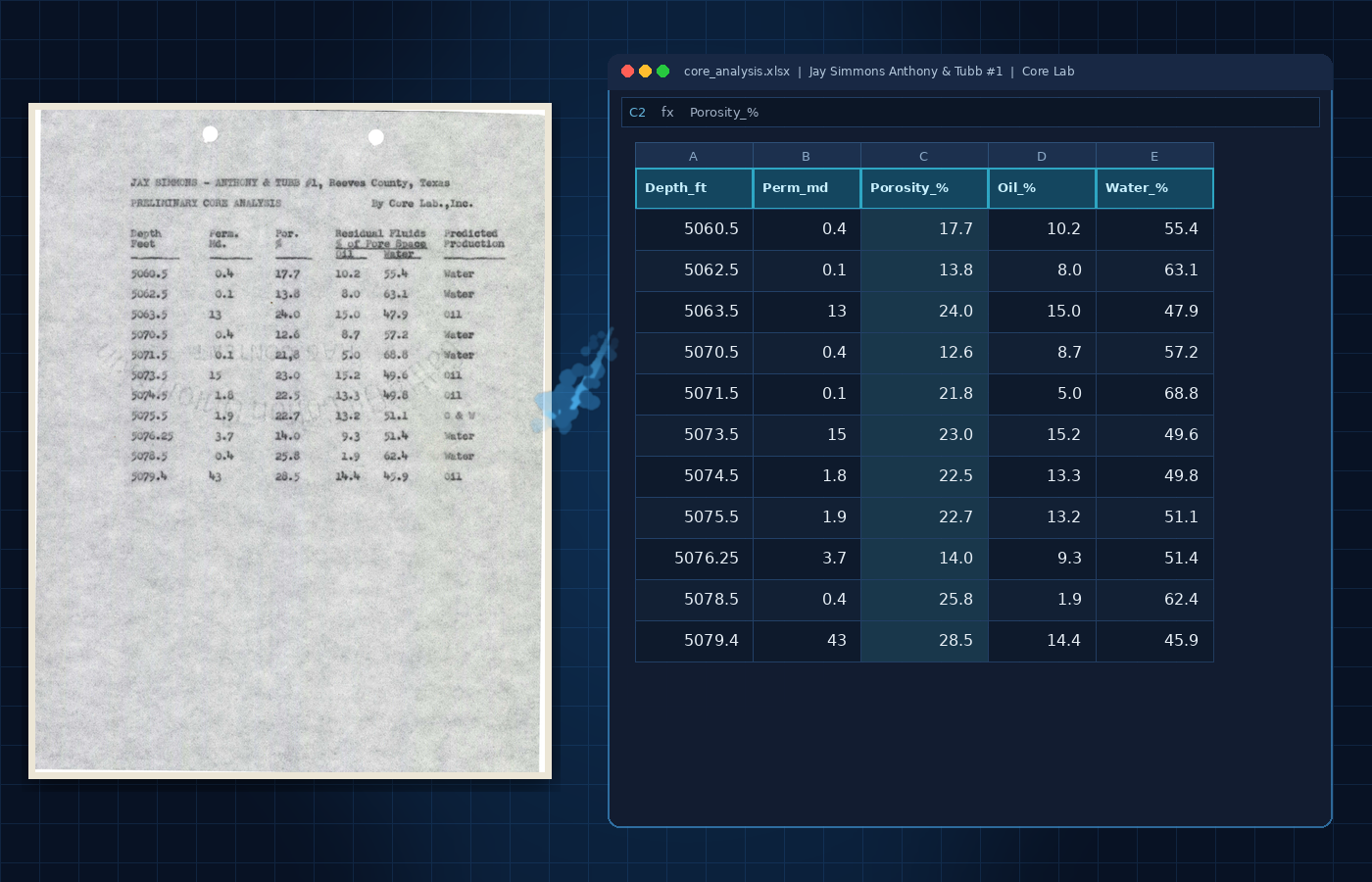
Legacy well files often include scanned core analysis reports from Core Lab and other labs. The tables have the numbers you need (porosity, permeability, saturations), but they sit as PDF, TIFF, PNG, or JPEG until someone retypes them.
Crawler extracts those routine core analysis (RCA) tables into structured data with Excel or CSV exports so petrophysicists can review and use them instead of keying them.
Routine Core Analysis (RCA) vs Root Cause Analysis
In oil and gas, RCA almost always means routine core analysis, not business root-cause analysis. An RCA table typically includes:
- Sample number and depth (ft)
- Porosity (%)
- Permeability (md; air / Klinkenberg when present)
- Grain density (g/cc)
- Residual oil and water saturation (% pore space)
- Lithology / description
Search terms that map to this job: core analysis PDF, core analysis PDF to Excel, core analysis TIFF, digitize RCA tables, routine core analysis Excel.
What Crawler Extracts from Scanned Core Reports
Crawler classifies and extracts technical documents into a searchable library. Review an extraction quote before approving the work, then check the results beside the original pages.
- Core analysis / RCA, mud logs, DSTs, and other G&G tables → Excel / CSV with Crawler
- Raster well-log curves → LAS through Nspect digitization and QC
For core analysis reports, extraction targets the columns above, plus well metadata (API, well name, operator, lab, formation) for Petrel, Kingdom, or a corporate store.
Also supported on the same path: sidewall core, SCAL-style tables, mud log strips, DST recoveries, completion tables. Each type uses a dedicated extraction model, not generic OCR alone.
How Core Analysis Table Extraction Works
- OCR and page cleanup (rotation, deskew, contrast, columns)
- Structure classification (table vs plot vs photo vs form)
- Table-type classification (core analysis vs mud log, etc.)
- Cell extraction (depth continuity, ditto marks, multi-page merge)
- Dedup across overlapping pages
- QC against geological ranges (e.g. porosity 0-40%, grain density ~2.0-3.5 g/cc)
Bulk Digitization for Data Rooms and A&D
For multi-well data rooms or A&D evaluations, upload batches of core analysis scans in parallel. The goal is structured RCA tables ready for G&G review, not overnight copy-paste.
On a prior E&P project, NthDS classified ~100,000 documents in a week and completed tabular work for ~3,500 wells / 30,000 pages in 45 days, with ~30% lower projected cost. Case study: AI metadata digitizing.
For larger archives, review the extraction quote before approving a batch. Platform processing: 73,000+ wells.
Which Product to Use
- Core analysis scan → structured data and Excel/CSV: Crawler
- Well-log curves → LAS, with digitization and QC: Nspect
- Buy LAS / metadata by the well: NDEX
- Search a full legacy well-file corpus: Crawler
FAQ
How do I convert a core analysis PDF or TIFF to Excel?
Use Crawler to extract routine core analysis tables into structured data. Review the extracted values against the original pages, then export CSV or Excel for your analysis workflow.
What is RCA in oil and gas core analysis?
Routine core analysis: porosity, permeability, grain density, and saturations by depth. Not root cause analysis.
Which NthDS product handles core reports and well logs?
Crawler extracts core analysis, RCA, mud log, and DST tables into searchable records with CSV and Excel exports. Nspect handles well-log curve digitization and QC for LAS delivery. Request a demo for your documents.
Can I review extracted values against the original core report?
Yes. Crawler displays extracted tables beside the original source pages so your team can check the underlying report before using the data.
Start with a Core Analysis Scan
See how Crawler extracts core analysis tables, supports source review, and exports structured data to Excel or CSV.